



If you already added your Facebook Pages to the scheduler and you forgot to add a page, or you created new pages after you’ve started using Neyrova, follow the guide below to import your new Facebook Pages.
Please make sure you’re logged into the right Facebook account on the same browser as Neyrova.
From Neyrova Menu, Go to Accounts > Add Account > Add Facebook Pages.
You should see the list of all pages.If the above doesn’t import the page you want, then proceed below:
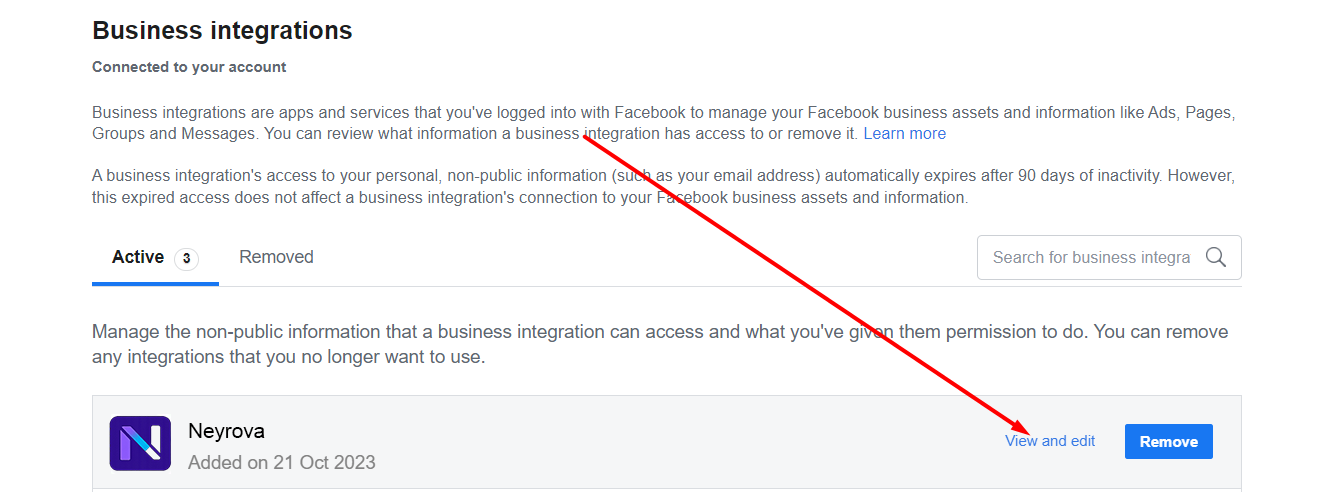
Look for the Neyrova App, and click on View and Edit
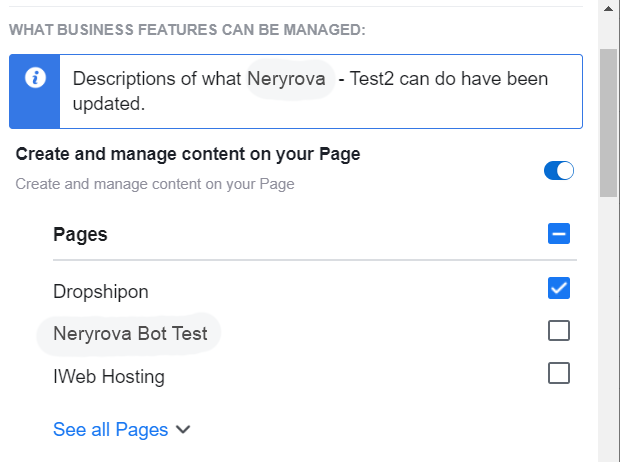
Under the Permissions ensure to check all the pages that you want to add. And Save.
Now go back to Step 2. And try to add the profiles again.
NOTE: If you check toggle all Pages in Step 5 above, all you need to do to import your future pages will be to simply follow the steps in Step 2.