



Learn how to quickly and easily filter your calendar by profiles and labels. This feature helps you stay organized and manage your social media strategy more efficiently.
-
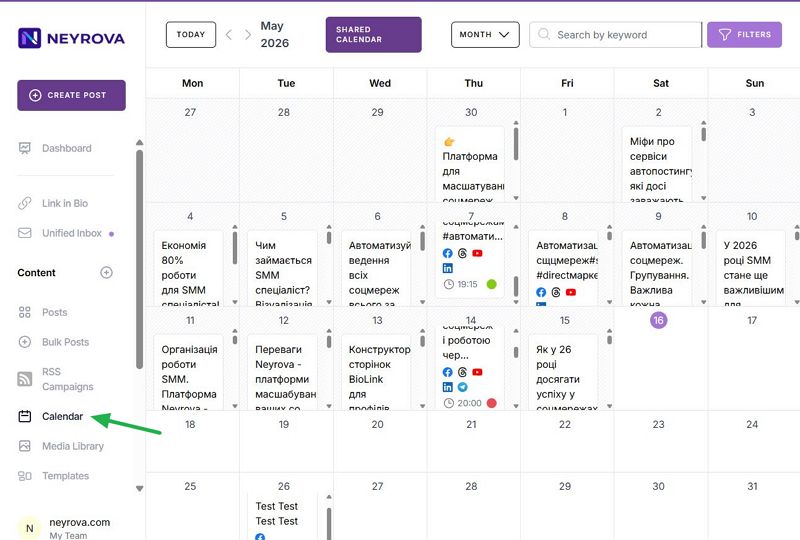
In the main menu, click Calendar. Here you can view all scheduled posts across different social media platforms.
-
To filter the calendar by profiles, click the filter button in the accounts section. You will see a list of all social media profiles connected to Neyrova. Select the desired profile and apply the filter.
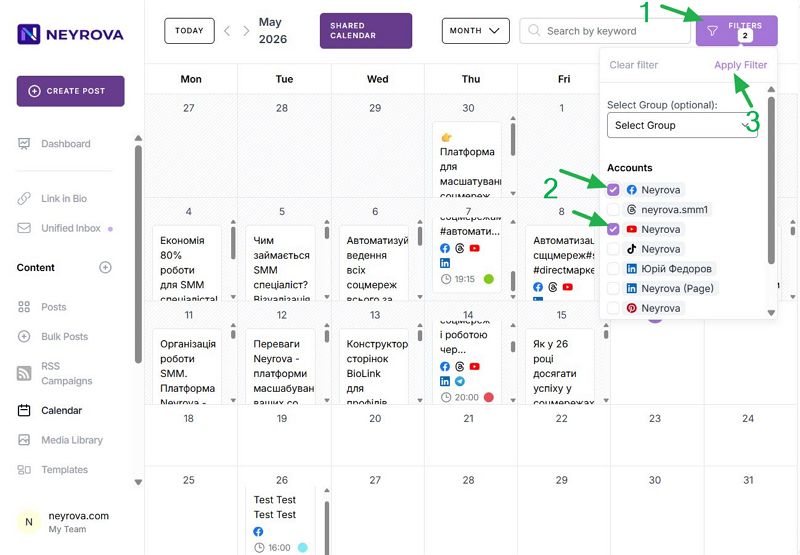
The calendar will display all posts associated with the selected profile. You can perform various actions, such as duplicating already scheduled posts or creating new ones directly from the calendar.
Next, let’s look at filtering by labels. Labels help categorize posts, making them easier to find and manage. To filter by labels, click the filter button again. In the Labels section, you will see a list of previously created labels.
Select the desired labels and apply the filter. The calendar will refresh and display only the posts that match the selected labels. This feature is especially useful for managing campaigns, content themes, or other categories.
For more precise control, you can combine profile and label filters. Select the desired profiles and labels, and the calendar will display posts that match both criteria.
This feature allows you to manage your social media strategy more effectively. Filtering the calendar by profiles and labels is a simple and effective way to keep your content management organized.