



This guide explains how to quickly delete one or multiple posts from the post log in Neyrova.
This is useful when you need to clean up outdated content, remove unnecessary publications, or delete posts that no longer fit your content strategy.
1. Sign In to Your Neyrova Account
Log in to your Neyrova account and open the dashboard.
2. Open the Posts Section
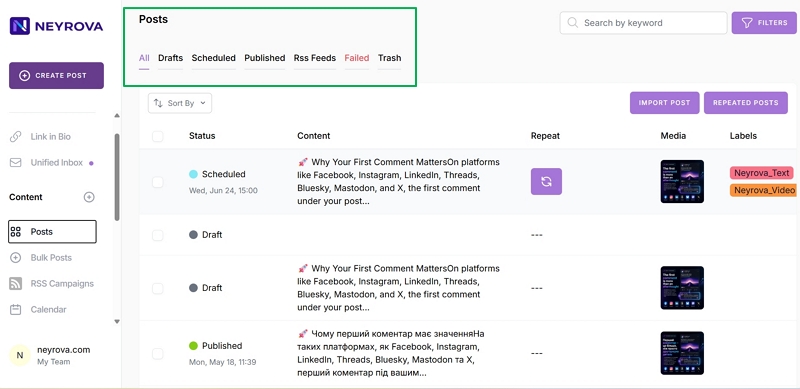
In the left-hand menu of the dashboard, click the Posts tab.
This section displays the complete list of posts, including drafts, scheduled posts, published posts, RSS posts, and items in the trash.
3. Review the List of Posts
After opening the Posts section, you will see the post log.
Here you can find the publications you want to remove and select them for deletion.
4. Select Posts to Delete
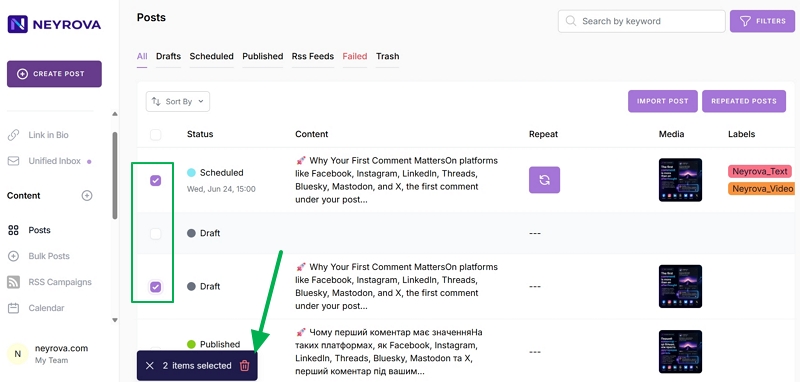
Check the boxes next to the publications you want to delete.
You can select a single post or multiple posts at once.
5. Click Delete
After selecting the desired publications, click the Delete button at the bottom of the list.
This will start the deletion process for the selected posts.
6. Confirm Deletion
After clicking Delete, a confirmation window will appear.
Make sure you have selected the correct posts and confirm the action by clicking Delete.
7. Check the Trash Section
After confirmation, the posts will be moved to the Trash section.
This means they have not yet been permanently deleted.
8. Select Posts for Permanent Deletion
To permanently delete posts, open the Trash section.
Select the desired posts or choose all publications at once.
9. Click Delete Again
After selecting posts in the Trash section, click Delete once more.
Confirm the action in the confirmation window.
10. Complete the Permanent Deletion
After confirmation, the selected posts will be permanently removed from Neyrova.
Before permanently deleting posts, make sure you no longer need those publications.
Summary
Neyrova allows you to quickly delete one or multiple posts from your publication log.
Posts are first moved to the Trash section, where they can later be permanently deleted. This provides a safe way to clean up content and maintain control over which publications remain in your account.