



This guide explains how to filter posts by labels, groups, and profiles in Neyrova.
This is useful if you manage multiple accounts, work with different content categories, or want to quickly find specific publications in your post log.
1. Sign In to Your Neyrova Account
Log in to your Neyrova account and open the dashboard.
2. Open the Posts Section
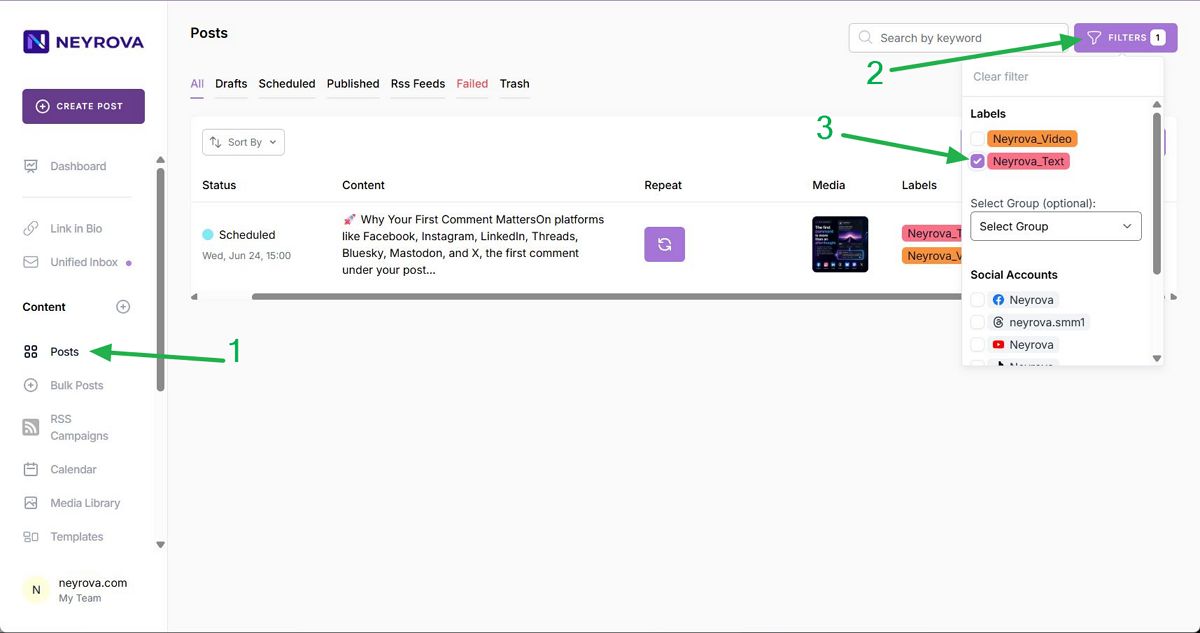
In the left-hand menu of the dashboard, click the Posts tab.
This section displays all your posts, including drafts, scheduled posts, published posts, RSS posts, failed posts, and items in the trash.
3. Review the Post Log
After opening the Posts section, you will see a list of all publications in your account.
Here, you can review posts along with their statuses and quickly navigate to specific content.
4. Open the Filters
To filter posts, click Filter.
This will open filtering options that allow you to narrow down the list of posts based on specific criteria.
5. Filter Posts by Labels
In the filters panel, open the Labels section.
Select the desired label. Neyrova will then display all posts associated with that label, along with their current status.
6. Filter Posts by Groups
To filter posts by group, open the Group dropdown list.
Select the desired group, and the post log will display all posts associated with that group.
7. Filter Posts by Profile
To filter posts by a specific profile, open the Accounts section.
Select the desired account, and Neyrova will display all posts created or scheduled for that profile.
8. Combine Multiple Filters
For more precise results, you can apply multiple filters at the same time.
This allows you to see only the posts that match all selected conditions.
9. Review Filtered Posts
After applying the filters, review the list of posts in the post log.
The results will display only the publications that match the selected labels, groups, or profiles.
Summary
Filtering posts by labels, groups, and profiles in Neyrova helps you quickly find the content you need and organize your publishing workflow.
This is especially useful when managing multiple accounts, different profile groups, or separate content categories.